Py3plex GUI Architecture
System Overview
The GUI stack runs as a small set of containers: a React frontend, a FastAPI API, and a Celery worker connected through Redis and fronted by nginx. Default ports and traffic paths are illustrated below so you can trace how a browser request reaches each service.
┌────────────────────────────────────────────────────────────────┐
│                    User Browser (Port 8080)                     │
└────────────────────────────────┬───────────────────────────────┘
                                 │
                                 │ HTTP
                                 ▼
┌────────────────────────────────────────────────────────────────┐
│                    Nginx Reverse Proxy                          │
│  ┌────────────────────┐  ┌─────────────────────────────────┐  │
│  │  Static Assets     │  │  API Proxy                      │  │
│  │  / → frontend      │  │  /api → api:8000                │  │
│  │  /assets → cache   │  │  /flower → flower:5555          │  │
│  └────────────────────┘  └─────────────────────────────────┘  │
└────────┬───────────────────────────────┬───────────────────────┘
         │                               │
         │ Dev Mode                      │
         │ (Hot Reload)                  │
         ▼                               ▼
┌──────────────────┐            ┌──────────────────────────────┐
│    Frontend      │            │       FastAPI Backend        │
│                  │            │                              │
│  React + Vite    │            │  Routes:                     │
│  TypeScript      │            │  - Health                    │
│  Tailwind CSS    │            │  - Upload                    │
│                  │            │  - Graphs                    │
│  Pages:          │            │  - Jobs                      │
│  - LoadData      │            │  - Analysis                  │
│  - Visualize     │            │  - Workspace                 │
│  - Analyze       │            │                              │
│  - Export        │            │  Services:                   │
│                  │            │  - io (file I/O)             │
│  Store:          │            │  - layouts                   │
│  - Zustand       │            │  - metrics                   │
│                  │            │  - community                 │
└──────────────────┘            │  - viz                       │
                                │  - workspace                 │
                                └────────────┬─────────────────┘
                                             │
                                             │ Celery Tasks
                                             ▼
┌──────────────────────────────────────────────────────────────┐
│                      Task Queue (Redis)                       │
│                     Port 6379                                 │
│  ┌─────────────────────────────────────────────────────┐    │
│  │  Job Queue:                                          │    │
│  │  - Layout tasks                                      │    │
│  │  - Centrality tasks                                  │    │
│  │  - Community detection tasks                         │    │
│  └─────────────────────────────────────────────────────┘    │
└────────────┬─────────────────────────────────┬──────────────┘
             │                                  │
             ▼                                  │
┌──────────────────────────────┐              │
│     Celery Worker            │              │
│                              │              │
│  Tasks:                      │              │
│  - run_layout()              │              │
│  - run_centrality()          │              │
│  - run_community()           │              │
│                              │              │
│  Progress Updates:           │              │
│  - PROGRESS state            │              │
│  - Meta (progress %, phase)  │              │
└──────────────────────────────┘              │
                                               │
                                               ▼
┌──────────────────────────────────────────────────────────────┐
│                      Flower Dashboard                         │
│                     Port 5555                                 │
│  - Monitor workers                                            │
│  - View task history                                          │
│  - Inspect task details                                       │
└──────────────────────────────────────────────────────────────┘
Data Flow
Two primary flows drive the application: uploading/parsing graphs and dispatching analysis jobs to Celery workers. Each flow returns an identifier (graph_id or job_id) so the frontend can poll for status and fetch artifacts without keeping state client-side.
Upload & Parse Flow
User → Frontend → API /upload → io.save_upload()
                                      ↓
                              io.load_graph_from_file()
                                      ↓
                              NetworkX graph loaded
                                      ↓
                              Stored in GRAPH_REGISTRY
                                      ↓
                              Return graph_id to frontend
Flow summary:
Frontend posts upload to
/upload.io.save_uploadpersists the file under/data/uploadsand detects the format.io.load_graph_from_fileparses to NetworkX (errors are surfaced to the client).Graph is cached in
GRAPH_REGISTRY(dev memory store) and agraph_idis returned.
Analysis Job Flow
User → Frontend → API /analysis/centrality
                        ↓
                  Create Celery task
                        ↓
                  Return job_id
                        ↓
                  Task queued in Redis
                        ↓
                  Worker picks up task
                        ↓
              task.update_state(progress=30)
                        ↓
              services.metrics.compute_centrality()
                        ↓
              Save results to /data/artifacts/
                        ↓
              task.update_state(progress=100, result={...})
                        ↓
User ← Frontend ← API /jobs/{job_id} ← Redis result backend
Flow summary:
Frontend submits an analysis request (e.g., centrality) with
graph_id.FastAPI enqueues a Celery task and immediately returns
job_id.Celery worker processes the job, updates
progress(0–100) in Redis, and writes artifacts.Frontend polls
/jobs/{job_id}until the result or failure details are available.
Directory Structure
The GUI lives in gui/ with backend, frontend, and worker projects aligned for Docker-based development. Runtime data stays under data/ and is gitignored.
gui/
├── docker-compose.yml          # Orchestration
├── compose.gpu.yml             # GPU override
├── Makefile                    # Dev commands
├── .env.example                # Config template
├── README                      # User guide
├── TESTING                     # Test guide
├── ARCHITECTURE                # Architecture notes
│
├── nginx/
│   └── nginx.conf              # Reverse proxy config
│
├── api/                        # Backend
│   ├── Dockerfile.api
│   ├── pyproject.toml
│   └── app/
│       ├── main.py             # FastAPI app
│       ├── deps.py             # Dependencies
│       ├── schemas.py          # Pydantic models
│       ├── routes/             # Endpoints
│       │   ├── health.py
│       │   ├── upload.py
│       │   ├── graphs.py
│       │   ├── jobs.py
│       │   ├── analysis.py
│       │   └── workspace.py
│       ├── services/           # Business logic
│       │   ├── io.py           # File I/O
│       │   ├── layouts.py      # Layout algorithms
│       │   ├── metrics.py      # Centrality metrics
│       │   ├── community.py    # Community detection
│       │   ├── viz.py          # Visualization data
│       │   ├── model.py        # Graph queries
│       │   └── workspace.py    # Save/load
│       ├── workers/            # Celery
│       │   ├── celery_app.py
│       │   └── tasks.py
│       └── utils/
│           └── logging.py
│
├── worker/
│   └── Dockerfile              # Worker container
│
├── frontend/                   # UI
│   ├── Dockerfile.frontend
│   ├── package.json
│   ├── vite.config.ts
│   └── src/
│       ├── main.tsx            # Entry point
│       ├── App.tsx             # Root component
│       ├── app.css             # Global styles
│       ├── lib/
│       │   ├── api.ts          # API client
│       │   └── store.ts        # State management
│       ├── pages/
│       │   ├── LoadData.tsx    # Upload page
│       │   ├── Visualize.tsx   # Viz page
│       │   ├── Analyze.tsx     # Analysis page
│       │   └── Export.tsx      # Export page
│       └── components/         # Reusable UI
│           ├── Uploader.tsx
│           ├── LayerPanel.tsx
│           ├── GraphCanvas.tsx
│           ├── JobCenter.tsx
│           ├── InspectPanel.tsx
│           └── Toasts.tsx
│
├── ci/                         # Tests
│   ├── api-tests/
│   │   ├── test_health.py
│   │   └── test_upload.py
│   ├── frontend-tests/
│   │   └── smoke.spec.ts
│   └── e2e.playwright.config.ts
│
└── data/                       # Runtime data (gitignored)
    ├── uploads/                # Uploaded files
    ├── artifacts/              # Job results
    └── workspaces/             # Saved bundles
Component Responsibilities
Use the sections below to map user-visible pages to the backend pieces they exercise, and to see which service owns which concern.
Visual Component Reference
The diagrams below map runtime components to the user-facing pages that exercise them.
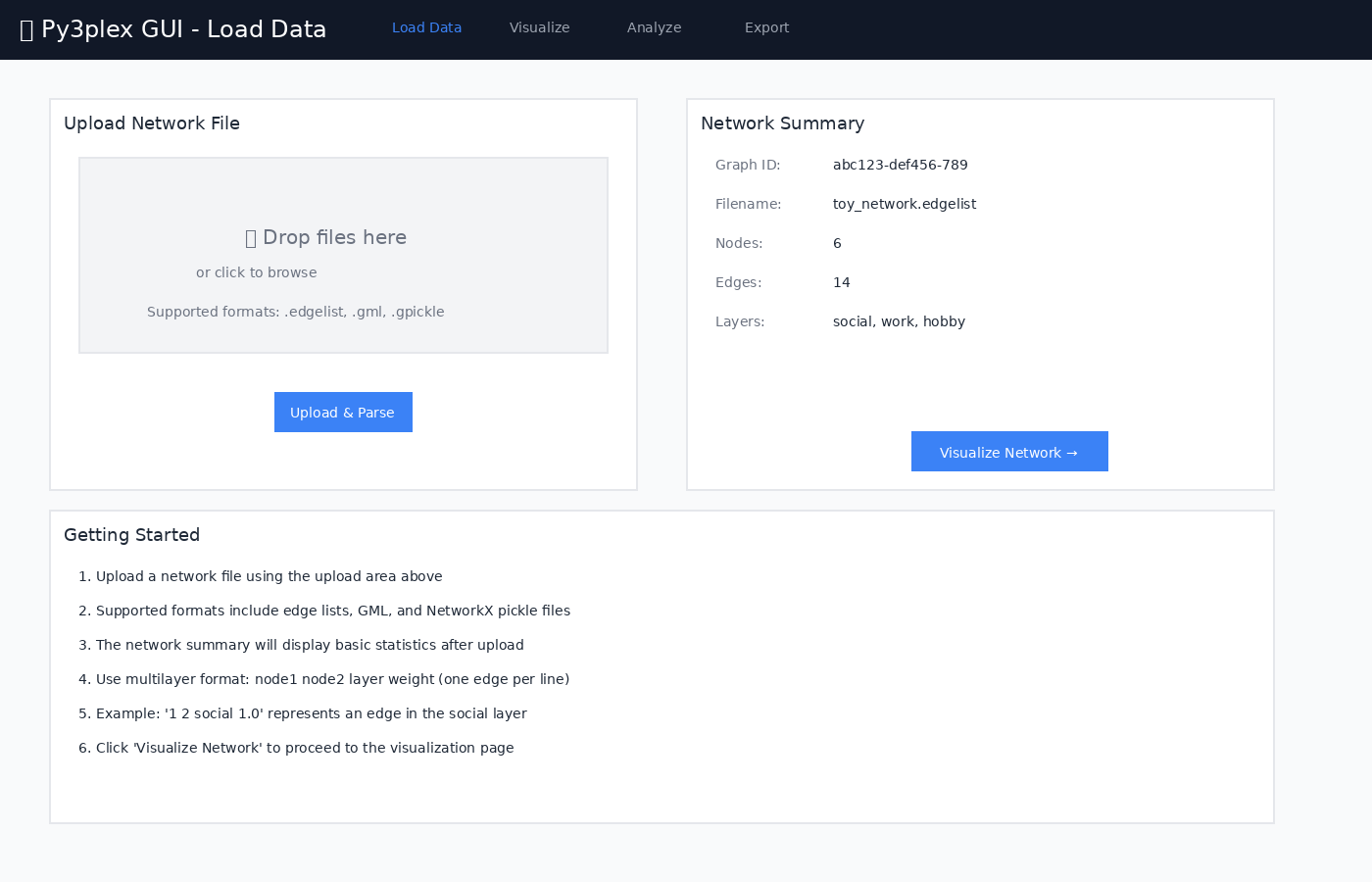
Figure 1: Frontend - Load Data page utilizing the IO service
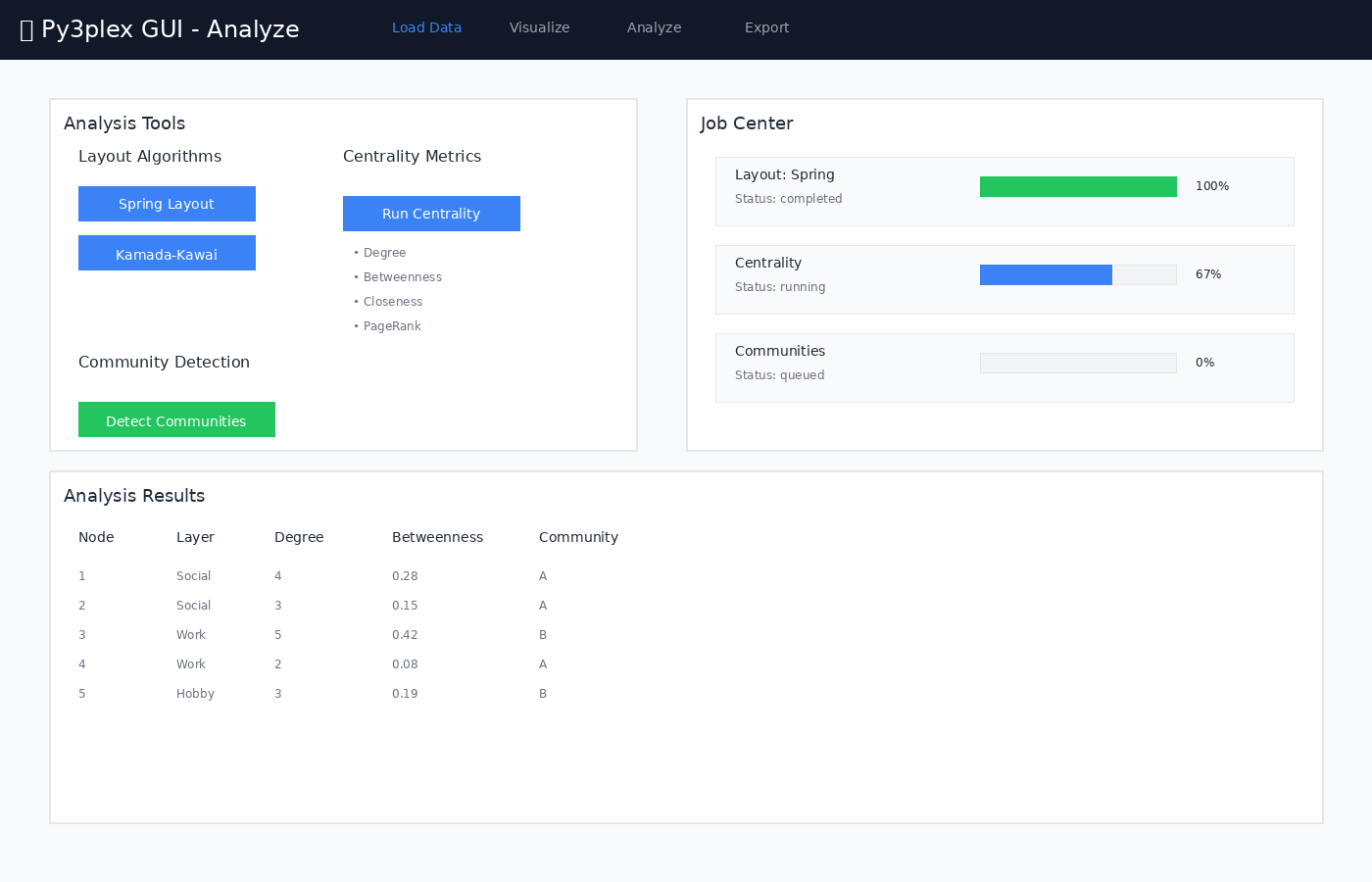
Figure 2: Job orchestration - Analysis page with Celery task execution
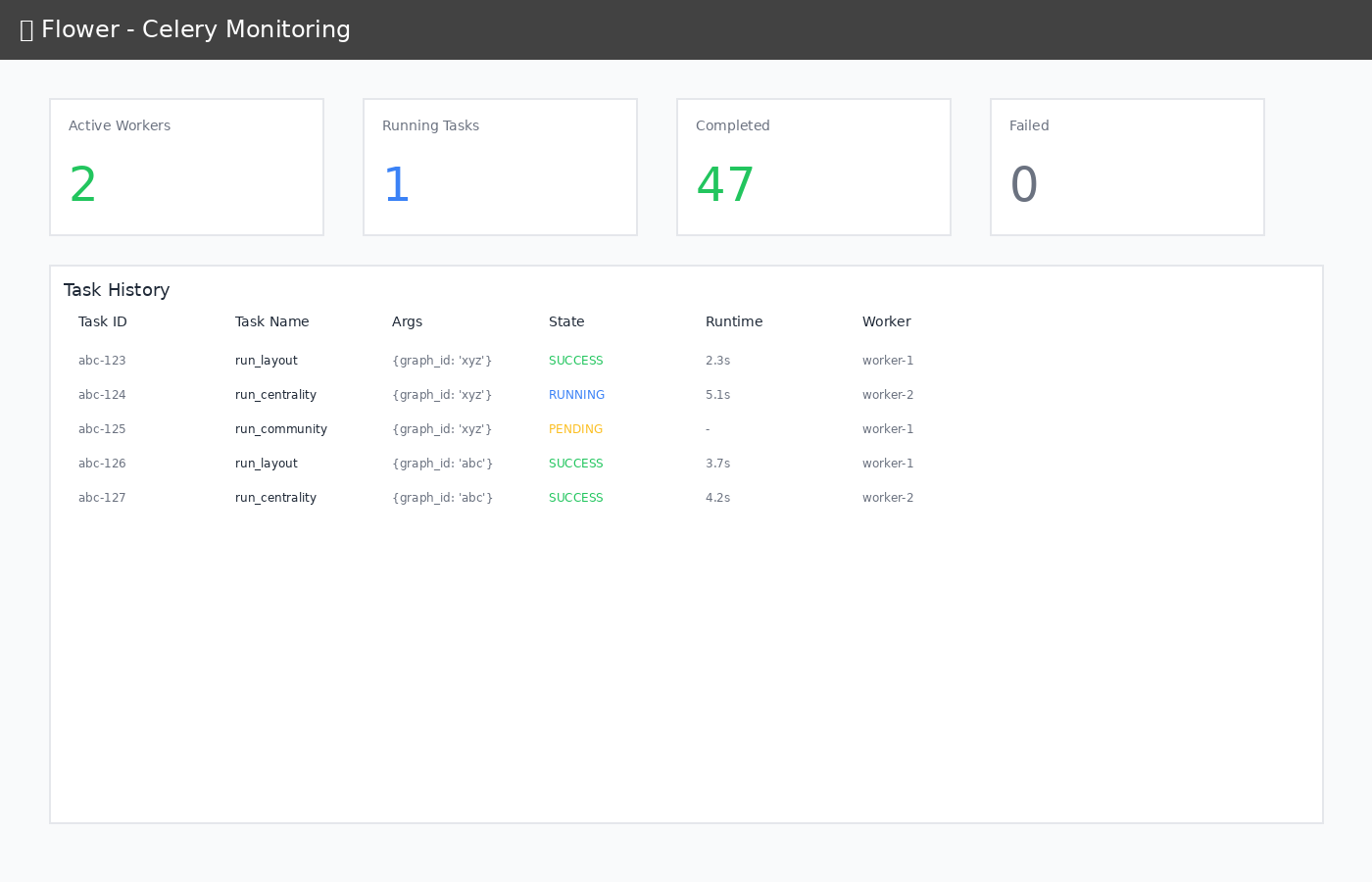
Figure 3: Worker monitoring - Flower dashboard showing task queue and execution
Frontend
Responsibilities:
User interaction
File upload UI
Real-time job polling and notifications
Graph visualization (lightweight preview)
State management (Zustand)
Technologies:
React 18 (UI framework)
Vite (build tool, dev server)
TypeScript (type safety)
Tailwind CSS (styling)
Axios (HTTP client)
API (FastAPI)
Responsibilities:
REST API endpoints
Request validation (Pydantic)
File upload handling
Job orchestration
py3plex integration (graph loading, analysis calls)
Key Services:
io: File loading, format detection, upload persistencelayouts: Layout computation (NetworkX)metrics: Centrality calculationscommunity: Community detectionworkspace: Save/load bundles
Worker (Celery)
Responsibilities:
Async job execution
Progress reporting
Result persistence
Resource management (concurrency via
CELERY_CONCURRENCY)
Tasks:
run_layout: Force-directed layoutsrun_centrality: Node/edge metricsrun_community: Community detectionProgress metadata is emitted via
task.update_statefor frontend polling
Redis
Responsibilities:
Job queue (broker)
Result backend
Session storage (planned; persist volume if durability is needed)
Nginx
Responsibilities:
Reverse proxy
Static file serving
Gzip compression
Caching headers
WebSocket proxy (HMR)
Flower
Responsibilities:
Worker monitoring
Task history
Performance metrics
Data Models
Graph Registry (In-Memory)
In development mode, uploaded graphs are kept in memory and indexed by a generated graph_id for subsequent analysis calls. Registry contents are lost if the API container restarts.
GRAPH_REGISTRY = {
    "<graph_id>": {
        "graph": nx.Graph(),           # NetworkX graph
        "filepath": "/data/uploads/...", # Original file
        "positions": [NodePosition()],  # Layout positions
        "metadata": {}                  # Extra info
    }
}
Job State (Redis)
Celery stores job metadata in Redis so the frontend can poll progress and fetch results.
{
    "job_id": "uuid",
    "status": "running",  # queued|running|completed|failed
    "progress": 50,       # 0-100
    "phase": "computing", # human-readable
    "result": {...}       # Output data
}
Workspace Bundle (Zip)
Workspace exports bundle the original upload and derived artifacts so a session can be restored or shared later.
workspace_{uuid}.zip
├── metadata.json         # Graph ID, view state
├── network.edgelist      # Original file
├── positions.json        # Layout positions
└── artifacts/
    ├── centrality.json
    └── community.json
Security Architecture
Current (Development Mode)
Read-only py3plex mount
Isolated data directories
CORS allows all origins (development convenience)
No authentication
No HTTPS
No rate limiting
Production Hardening
Note: The GUI is designed for local development and research use. For production deployment, consider the following security enhancements:
Security Checklist:
Security Feature |
Implementation Notes |
|---|---|
HTTPS/TLS |
Use nginx or Caddy as reverse proxy with SSL certificates |
Authentication |
Implement OAuth2 or JWT-based authentication |
Authorization |
Role-based access control (RBAC) for multi-user environments |
CORS Configuration |
Restrict allowed origins to specific domains |
Rate Limiting |
Use nginx rate limiting or FastAPI middleware |
Input Validation |
Sanitize all user inputs (file uploads, query strings) |
Data Isolation |
Separate user workspaces with filesystem permissions |
Audit Logging |
Log all API access and queries for security auditing |
Dependency Updates |
Regularly update frontend and backend dependencies |
Container Security |
Use minimal base images, scan for vulnerabilities |
Recommended Production Architecture:
┌─────────────────────────────────────────┐
│        HTTPS Load Balancer              │
│        (nginx / Caddy)                  │
└─────────────────┬───────────────────────┘
                  │
                  ▼
┌─────────────────────────────────────────┐
│        Authentication Gateway            │
│        (OAuth2 / JWT)                    │
└─────────────────┬───────────────────────┘
                  │
                  ▼
┌─────────────────────────────────────────┐
│        Rate Limiter                      │
│        (Redis-based)                     │
└─────────────────┬───────────────────────┘
                  │
                  ▼
          [Existing Stack]
Deployment Variants
Pick a Docker Compose configuration variant based on available hardware and intended use.
Local Development (Current)
make up # All containers on localhost
GPU-Enabled
docker compose -f docker-compose.yml -f compose.gpu.yml up
Production (Future)
# docker-compose.prod.yml
services:
  frontend:
    image: frontend:prod
    # Pre-built static files

  api:
    replicas: 3
    # Load balanced

  worker:
    replicas: 5
    # Auto-scaling
Network Topology
┌──────────────────────────────────────────────────┐
│  Docker Network: py3plex-gui-network             │
│                                                   │
│  ┌─────────┐  ┌─────┐  ┌────────┐  ┌────────┐  │
│  │ Nginx   │  │ API │  │ Worker │  │ Redis  │  │
│  │ :80     │  │:8000│  │        │  │ :6379  │  │
│  └────┬────┘  └──┬──┘  └───┬────┘  └───┬────┘  │
│       │          │         │            │        │
│       └──────────┴─────────┴────────────┘        │
│                                                   │
│  ┌──────────┐  ┌────────┐                        │
│  │ Frontend │  │ Flower │                        │
│  │ :5173    │  │ :5555  │                        │
│  └──────────┘  └────────┘                        │
│                                                   │
└──────────────────────────────────────────────────┘
         │
         └─→ Host ports: 8080, 5555
Volume Mounts
Host                      → Container
../                       → /workspace (ro)
../data/                  → /data
../api/app/               → /app (dev mode)
../frontend/src/          → /app/src (dev mode)
Read-only mounts keep source immutable inside containers; /data remains writable for uploads, artifacts, and workspaces.
Environment Variables
Key runtime toggles are provided via environment variables; sizes are in MB unless noted.
# API
API_WORKERS=2              # Uvicorn workers
MAX_UPLOAD_MB=512          # Max file size
DATA_DIR=/data             # Data root

# Celery
CELERY_CONCURRENCY=2       # Worker threads
REDIS_URL=redis://redis:6379/0

# Frontend
VITE_API_URL=http://localhost:8080/api
Performance Characteristics
Timings below are indicative from local development runs on a laptop; real performance depends on hardware, graph size, and selected algorithms.
Small Graphs (< 100 nodes)
Upload: < 1s
Layout: 2-5s
Centrality: 1-3s
Community: 1-3s
Medium Graphs (100-1000 nodes)
Upload: 1-3s
Layout: 5-15s
Centrality: 3-10s
Community: 3-10s
Large Graphs (> 1000 nodes)
Consider sampling for preview
Progressive rendering recommended
May need GPU acceleration
Memory: rough rule of thumb is ~1GB per 10k nodes (depends on density)
Future Enhancements
Phase 2
WebGL visualization
Real-time collaboration
Database backend (PostgreSQL)
Authentication service
CI/CD pipeline
Phase 3
GraphQL API
Plugin system
Custom algorithms
Cloud deployment
Multi-tenancy
—
Version: 0.1.0
Last Updated: 2025-11-09