Py3plex GUI Architecture
This document explains how the GUI stack (frontend, FastAPI backend, Celery workers, Redis, and nginx) fits together, how data moves through it, and where to look when troubleshooting or extending a feature.
System Overview
High-level container topology and dev ports for the docker-compose development stack.
┌────────────────────────────────────────────────────────────────┐
│                    User Browser (Port 8080)                     │
└────────────────────────────────┬───────────────────────────────┘
                                 │
                                 │ HTTP
                                 ▼
┌────────────────────────────────────────────────────────────────┐
│                    Nginx Reverse Proxy                          │
│  ┌────────────────────┐  ┌─────────────────────────────────┐  │
│  │  Static Assets     │  │  API Proxy                      │  │
│  │  / → frontend      │  │  /api → api:8000                │  │
│  │  /assets → cache   │  │  /flower → flower:5555          │  │
│  └────────────────────┘  └─────────────────────────────────┘  │
└────────┬───────────────────────────────┬───────────────────────┘
         │                               │
         │ Dev Mode                      │
         │ (Hot Reload)                  │
         ▼                               ▼
┌──────────────────┐            ┌──────────────────────────────┐
│    Frontend      │            │       FastAPI Backend        │
│                  │            │                              │
│  React + Vite    │            │  Routes:                     │
│  TypeScript      │            │  - Health                    │
│  Tailwind CSS    │            │  - Upload                    │
│                  │            │  - Graphs                    │
│  Pages:          │            │  - Jobs                      │
│  - LoadData      │            │  - Analysis                  │
│  - Visualize     │            │  - Workspace                 │
│  - Analyze       │            │                              │
│  - Export        │            │  Services:                   │
│                  │            │  - io (file I/O)             │
│  Store:          │            │  - layouts                   │
│  - Zustand       │            │  - metrics                   │
│                  │            │  - community                 │
└──────────────────┘            │  - viz                       │
                                │  - workspace                 │
                                └────────────┬─────────────────┘
                                             │
                                             │ Celery Tasks
                                             ▼
┌──────────────────────────────────────────────────────────────┐
│                      Task Queue (Redis)                       │
│                     Port 6379                                 │
│  ┌─────────────────────────────────────────────────────┐    │
│  │  Job Queue:                                          │    │
│  │  - Layout tasks                                      │    │
│  │  - Centrality tasks                                  │    │
│  │  - Community detection tasks                         │    │
│  └─────────────────────────────────────────────────────┘    │
└────────────┬─────────────────────────────────┬──────────────┘
             │                                  │
             ▼                                  │
┌──────────────────────────────┐              │
│     Celery Worker            │              │
│                              │              │
│  Tasks:                      │              │
│  - run_layout()              │              │
│  - run_centrality()          │              │
│  - run_community()           │              │
│                              │              │
│  Progress Updates:           │              │
│  - PROGRESS state            │              │
│  - Meta (progress %, phase)  │              │
└──────────────────────────────┘              │
                                               │
                                               ▼
┌──────────────────────────────────────────────────────────────┐
│                      Flower Dashboard                         │
│                     Port 5555                                 │
│  - Monitor workers                                            │
│  - View task history                                          │
│  - Inspect task details                                       │
└──────────────────────────────────────────────────────────────┘
Data Flow
Upload & Parse Flow
Reads a file from the browser, writes it to disk, and registers a NetworkX graph in memory for subsequent API calls.
User → Frontend → API /upload → io.save_upload()
                                      ↓
                              io.load_graph_from_file()
                                      ↓
                              NetworkX graph loaded
                                      ↓
                              Stored in GRAPH_REGISTRY
                                      ↓
                              Return graph_id to frontend
Analysis Job Flow
Queues CPU-heavy work (layout, centrality, community detection) and streams progress back to the UI via Redis; errors surface on the same polling endpoint.
User → Frontend → API /analysis/centrality
                        ↓
                  Create Celery task
                        ↓
                  Return job_id
                        ↓
                  Task queued in Redis
                        ↓
                  Worker picks up task
                        ↓
              task.update_state(progress=30)
                        ↓
              services.metrics.compute_centrality()
                        ↓
              Save results to /data/artifacts/
                        ↓
              task.update_state(progress=100, result={...})
                        ↓
User ← Frontend ← API /jobs/{job_id} ← Redis result backend
Directory Structure
gui/
├── docker-compose.yml          # Orchestration
├── compose.gpu.yml             # GPU override
├── Makefile                    # Dev commands
├── .env.example                # Config template
├── README                      # User guide
├── TESTING                     # Test guide
├── ARCHITECTURE                # Architecture notes
│
├── nginx/
│   └── nginx.conf              # Reverse proxy config
│
├── api/                        # Backend
│   ├── Dockerfile.api
│   ├── pyproject.toml
│   └── app/
│       ├── main.py             # FastAPI app
│       ├── deps.py             # Dependencies
│       ├── schemas.py          # Pydantic models
│       ├── routes/             # Endpoints
│       │   ├── health.py
│       │   ├── upload.py
│       │   ├── graphs.py
│       │   ├── jobs.py
│       │   ├── analysis.py
│       │   └── workspace.py
│       ├── services/           # Business logic
│       │   ├── io.py           # File I/O
│       │   ├── layouts.py      # Layout algorithms
│       │   ├── metrics.py      # Centrality metrics
│       │   ├── community.py    # Community detection
│       │   ├── viz.py          # Visualization data
│       │   ├── model.py        # Graph queries
│       │   └── workspace.py    # Save/load
│       ├── workers/            # Celery
│       │   ├── celery_app.py
│       │   └── tasks.py
│       └── utils/
│           └── logging.py
│
├── worker/
│   └── Dockerfile              # Worker container
│
├── frontend/                   # UI
│   ├── Dockerfile.frontend
│   ├── package.json
│   ├── vite.config.ts
│   └── src/
│       ├── main.tsx            # Entry point
│       ├── App.tsx             # Root component
│       ├── app.css             # Global styles
│       ├── lib/
│       │   ├── api.ts          # API client
│       │   └── store.ts        # State management
│       ├── pages/
│       │   ├── LoadData.tsx    # Upload page
│       │   ├── Visualize.tsx   # Viz page
│       │   ├── Analyze.tsx     # Analysis page
│       │   └── Export.tsx      # Export page
│       └── components/         # Reusable UI
│           ├── Uploader.tsx
│           ├── LayerPanel.tsx
│           ├── GraphCanvas.tsx
│           ├── JobCenter.tsx
│           ├── InspectPanel.tsx
│           └── Toasts.tsx
│
├── ci/                         # Tests
│   ├── api-tests/
│   │   ├── test_health.py
│   │   └── test_upload.py
│   ├── frontend-tests/
│   │   └── smoke.spec.ts
│   └── e2e.playwright.config.ts
│
└── data/                       # Runtime data (gitignored)
    ├── uploads/                # Uploaded files
    ├── artifacts/              # Job results
    └── workspaces/             # Saved bundles
Component Responsibilities
Each block below summarizes what runs where so you can navigate the codebase quickly and understand which service owns a behavior.
Visual Component Reference
The architecture components are realized in the following user interface pages:
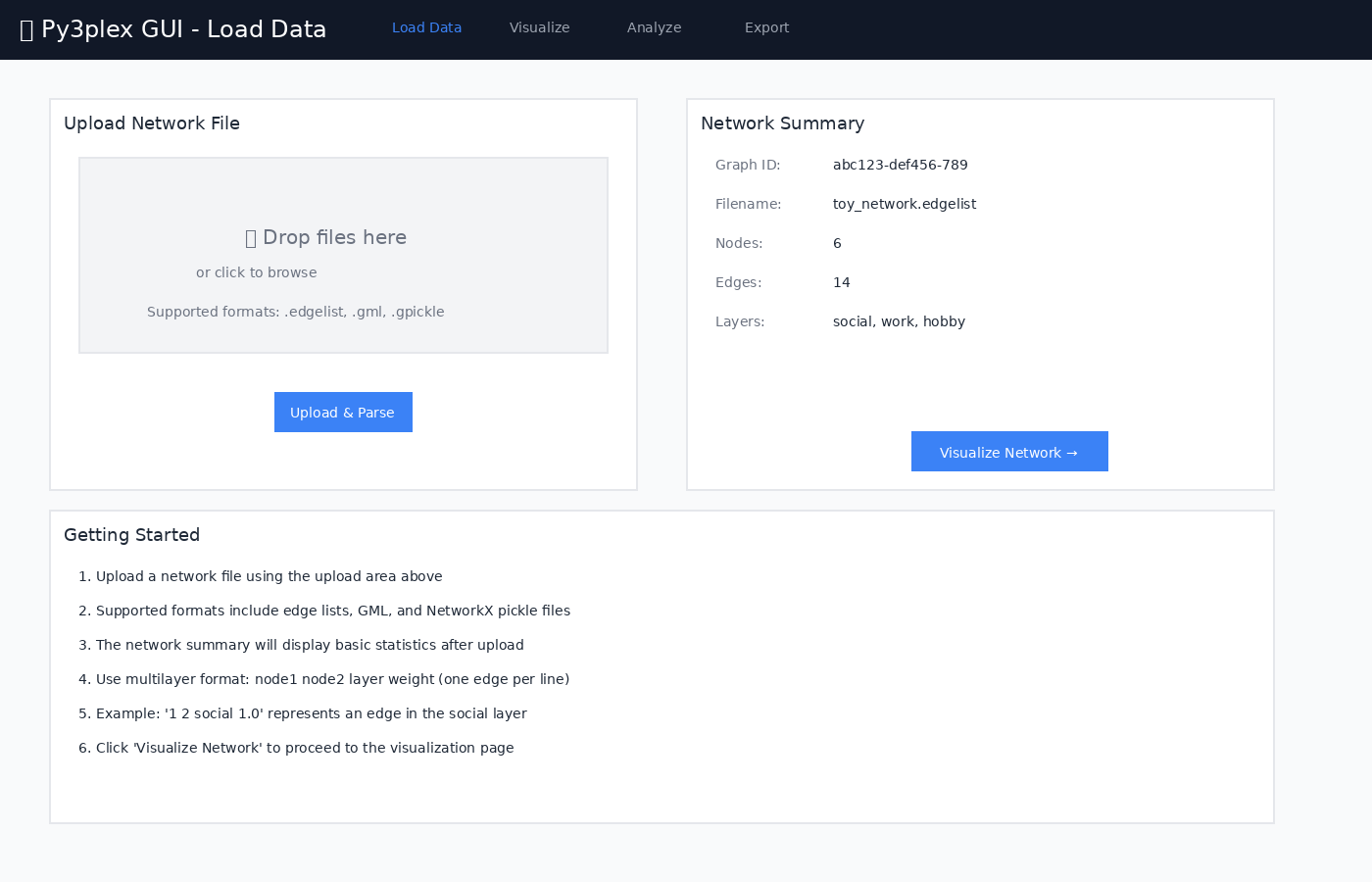
Figure 1: Frontend - Load Data page utilizing the IO service
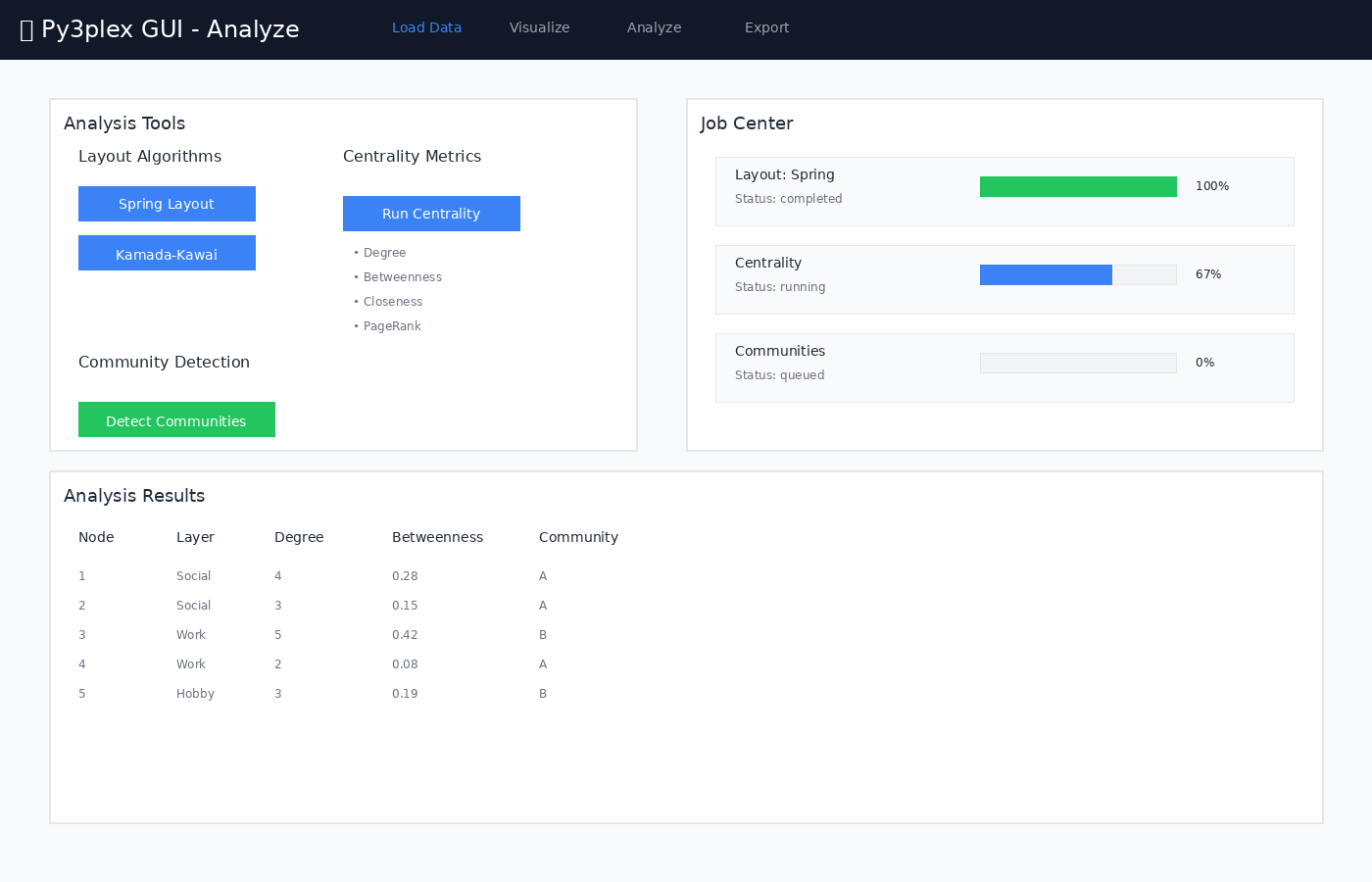
Figure 2: Job orchestration - Analysis page with Celery task execution
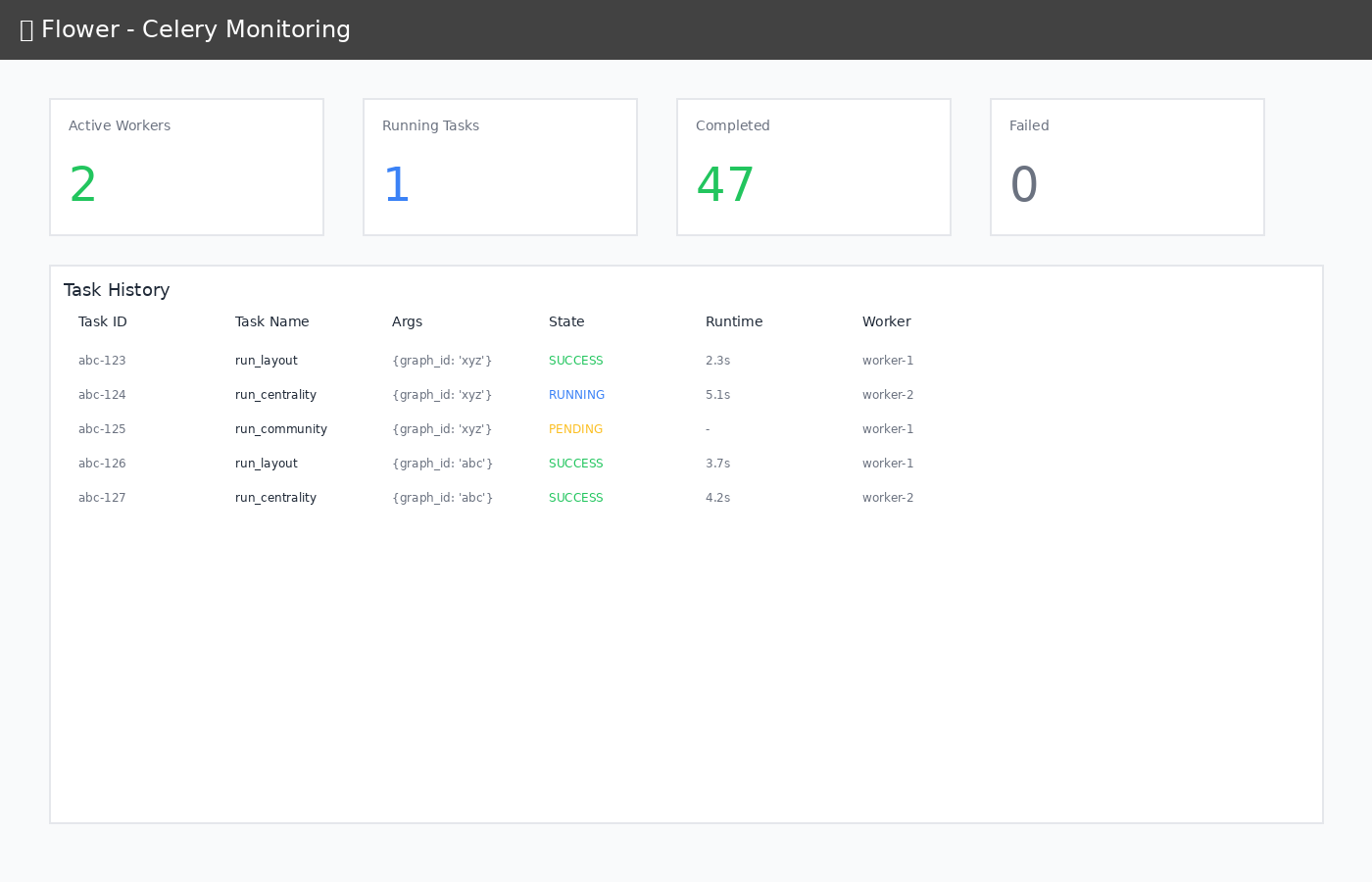
Figure 3: Worker monitoring - Flower dashboard showing task queue and execution
Frontend
Responsibilities:
User interaction
File upload UI
Real-time job polling
Graph visualization (current placeholder renderer)
State management (Zustand)
Technologies:
React 18 (UI framework)
Vite (build tool, dev server)
TypeScript (type safety)
Tailwind CSS (styling)
Axios (HTTP client)
API (FastAPI)
Responsibilities:
REST API endpoints
Request validation (Pydantic)
File upload handling
Job orchestration
py3plex integration
Graph registry lifecycle and artifact paths
Key Services:
io: File loading, format detectionlayouts: Layout computation (NetworkX)metrics: Centrality calculationscommunity: Community detectionworkspace: Save/load bundlesmodel: Registry access and graph queries
Worker (Celery)
Responsibilities:
Async job execution
Progress reporting
Result persistence
Resource management (bounded by
CELERY_CONCURRENCY)
Tasks:
run_layout: Force-directed layoutsrun_centrality: Node/edge metricsrun_community: Community detection
Redis
Responsibilities:
Job queue (broker)
Result backend
Session storage (future)
Caches are small by design; long-lived artifacts stay on disk.
Nginx
Responsibilities:
Reverse proxy
Static file serving
Gzip compression
Caching headers
WebSocket proxy (HMR)
Flower
Responsibilities:
Worker monitoring
Task history
Performance metrics
Quick sanity check when jobs stall or are delayed.
Data Models
Graph Registry (In-Memory)
GRAPH_REGISTRY = {
    "<graph_id>": {
        "graph": nx.Graph(),           # NetworkX graph
        "filepath": "/data/uploads/...", # Original file
        "positions": [NodePosition()],  # Layout positions
        "metadata": {}                  # Extra info
    }
}
Stores lightweight metadata and the in-memory NetworkX object for quick API access. Large artifacts (layouts, metrics) live under /data/artifacts/<graph_id>/ instead of bloating Redis.
Registry contents are process-local; a backend restart clears uploads unless they are exported to a workspace bundle.
Job State (Redis)
{
    "job_id": "uuid",
    "status": "running",  # queued|running|completed|failed
    "progress": 50,       # 0-100
    "phase": "computing", # human-readable
    "result": {...}       # Output data
}
A Celery task updates progress and phase via update_state so the UI can poll /jobs/{job_id} without hitting the worker directly.
queued transitions to running once a worker starts; failed includes the exception string in result.error.
Workspace Bundle (Zip)
workspace_{uuid}.zip
├── metadata.json         # Graph ID, view state
├── network.edgelist      # Original file
├── positions.json        # Layout positions
└── artifacts/
    ├── centrality.json
    └── community.json
Bundles let users pause work and resume later; only the bundle ID needs to be stored client-side.
Security Architecture
Current (Development Mode)
Read-only py3plex mount
Isolated data directories
CORS allows all origins
No authentication
No HTTPS
No rate limiting
Production Hardening
Note: The GUI is designed for local development and research use. For production deployment, consider the following security enhancements:
Security Checklist:
Security Feature |
Implementation Notes |
|---|---|
HTTPS/TLS |
Use nginx or Caddy as reverse proxy with SSL certificates |
Authentication |
Implement OAuth2 or JWT-based authentication |
Authorization |
Role-based access control (RBAC) for multi-user environments |
CORS Configuration |
Restrict allowed origins to specific domains |
Rate Limiting |
Use nginx rate limiting or FastAPI middleware |
Input Validation |
Sanitize all user inputs (file uploads, query strings) |
Data Isolation |
Separate user workspaces with filesystem permissions |
Audit Logging |
Log all API access and queries for security auditing |
Dependency Updates |
Regularly update frontend and backend dependencies |
Container Security |
Use minimal base images, scan for vulnerabilities |
Recommended Production Architecture:
┌─────────────────────────────────────────┐
│        HTTPS Load Balancer              │
│        (nginx / Caddy)                  │
└─────────────────┬───────────────────────┘
                  │
                  ▼
┌─────────────────────────────────────────┐
│        Authentication Gateway            │
│        (OAuth2 / JWT)                    │
└─────────────────┬───────────────────────┘
                  │
                  ▼
┌─────────────────────────────────────────┐
│        Rate Limiter                      │
│        (Redis-based)                     │
└─────────────────┬───────────────────────┘
                  │
                  ▼
          [Existing Stack]
Deployment Variants
Local Development (Current)
make up # All containers on localhost (frontend/api hot reload)
GPU-Enabled
docker compose -f docker-compose.yml -f compose.gpu.yml up
Production (Future)
# docker-compose.prod.yml
services:
  frontend:
    image: frontend:prod
    # Pre-built static files

  api:
    replicas: 3
    # Load balanced

  worker:
    replicas: 5
    # Auto-scaling
Network Topology
┌──────────────────────────────────────────────────┐
│  Docker Network: py3plex-gui-network             │
│                                                   │
│  ┌─────────┐  ┌─────┐  ┌────────┐  ┌────────┐  │
│  │ Nginx   │  │ API │  │ Worker │  │ Redis  │  │
│  │ :80     │  │:8000│  │        │  │ :6379  │  │
│  └────┬────┘  └──┬──┘  └───┬────┘  └───┬────┘  │
│       │          │         │            │        │
│       └──────────┴─────────┴────────────┘        │
│                                                   │
│  ┌──────────┐  ┌────────┐                        │
│  │ Frontend │  │ Flower │                        │
│  │ :5173    │  │ :5555  │                        │
│  └──────────┘  └────────┘                        │
│                                                   │
└──────────────────────────────────────────────────┘
         │
         └─→ Host ports: 8080, 5555
Volume Mounts
Host                      → Container
../                       → /workspace (ro)
../data/                   → /data
../api/app/                → /app (dev mode)
../frontend/src/           → /app/src (dev mode)
Read-only mounts keep source code immutable inside containers; /data remains writable for uploads, job artifacts, and workspace bundles.
Environment Variables
# API
API_WORKERS=2              # Uvicorn workers
MAX_UPLOAD_MB=512          # Max file size
DATA_DIR=/data             # Data root

# Celery
CELERY_CONCURRENCY=2       # Worker threads
REDIS_URL=redis://redis:6379/0

# Frontend
VITE_API_URL=http://localhost:8080/api
These mirror .env.example; copy to .env and adjust per deployment.
Performance Characteristics
Indicative timings from the dev container; expect variance with hardware, graph size, and algorithms.
Small Graphs (< 100 nodes)
Upload: typically < 1s
Layout: ~2-5s
Centrality: ~1-3s
Community: ~1-3s
Medium Graphs (100-1000 nodes)
Upload: ~1-3s
Layout: ~5-15s
Centrality: ~3-10s
Community: ~3-10s
Large Graphs (> 1000 nodes)
Consider sampling for preview
Progressive rendering recommended
May need GPU acceleration
Memory: rough heuristic is ~1GB per 10k nodes; measure for your dataset and hardware
Future Enhancements
Phase 2
WebGL visualization for large graphs
Real-time collaboration
Database backend (PostgreSQL)
Authentication service
CI/CD pipeline
Phase 3
GraphQL API
Plugin system
Custom algorithms
Cloud deployment
Multi-tenancy
—
Version: 0.1.0
Last Updated: 2025-12-18 (update when architecture changes)